Hazel reports · ^report(43) · Hazel as a JS library · started 2026-11-06, updated 2026-11-06 17:04 MST · work in progress · after ^report(39)
Scripting a JavaScript App in Hazel
Messed Up Dress Up, a game for kids written in plain JavaScript, lets its players rewrite some of the game's rules in Hazel while they play. It does that through hazeljs, Hazel packaged as a JavaScript library. This report explains how the game does it, and how a JavaScript developer could do the same in their own program: the pattern, the steps, a worked example in another domain, run in Node, and what it costs today. It is the first of two reports on using hazeljs from JavaScript: this one, in a whole app whose rules are Hazel; ^report(44), in an article, its Hazel listings in Hazel's own editor (the way this page shows its listings). Matthew asked for it on 2026-11-06, for his meeting with Cyrus on 2026-11-11 (^report(42), the agenda, item 5). The first readers in mind are a group in Cambridge who simulate Petri nets with JavaScript tools of their own, so the example is a Petri net. As of 2026-11-06, with hazeljs 0.0.4 from npm.
Outline#
- The pattern: what a JS app hands to Hazel, what it gets back, and why write a handler in Hazel at all.
- How Messed Up Dress Up does it: the game's pieces, from its Hazel types to acting out a rule's commands, each linked to its code.
- Doing the same in another app: the six steps as we took them for a Petri net app of our own, and where other kinds of Petri nets fit.
- A worked example: a Petri net: the net running on this page with its rules in Hazel's editor (try it), and what the same rules did in Node (the runs).
- What it costs: a call into Hazel, a build and a rebuild, against the same handler in JS.
- Limits today, and what tripped us: three things building a second app turned up, a bug in
hazeljsamong them. - What next, and how this was put together.
The pattern#
Your app keeps its state and its screen, and Hazel only decides. On an event, the app calls a Hazel function with a typed view of its state and the event, and carries out the command the function returns, which is plain data (Figure 1).
Many JavaScript programs are organized around events: a click, a key, a timer, a message. In this pattern, some of those events are handed to a function written in Hazel. The JS side builds two values: one describing what happened (the event), and one describing what the handler may see (a view of the app's state). It calls the Hazel function with both, and gets back a value describing what to do (a command). Hazel never touches the page or the app's objects; its answer is data, and the app acts it out. We call a program built this way a Hazlet; Messed Up Dress Up is the first one (^report(39)).
Why write a handler in Hazel at all? Three reasons, each of which the game uses:
- Types for the vocabulary. The app declares what a rule is told and what it may answer, as Hazel types. A rule that answers with the wrong thing is a type error before it ever runs, and the error names the module it is in.
- Feedback in the middle of an edit. Hazel analyzes and runs programs that are not finished: a hole (
?) is a part not yet written, and Hazel counts holes and unfinished brackets per module rather than failing. An editor can show the person writing a rule exactly what is wrong, and where, at every keystroke. - Rules that people other than the app's developers can change, without access to the app's code: in the game, kids rewire the castle's traps.
How Messed Up Dress Up does it#
In the game's 📜 Scripting tab, the game's logic for five rooms is a Hazel program made of modules: 📚 Common, helpers every room can use, then one module per room. A red lever pulled in the castle's trap room is the event Pull(L). The game builds the room's view of its state, a Globals record (the levers, how the pits are wired, the game's random draws, and more), and calls TrapRoom.on_event. The rule answers a Cmd, a chain of commands such as Flip(L, SetPit(0, true, Done)): flip the lever, then open pit 0. The game carries out each command the way its own code would, with its animation.
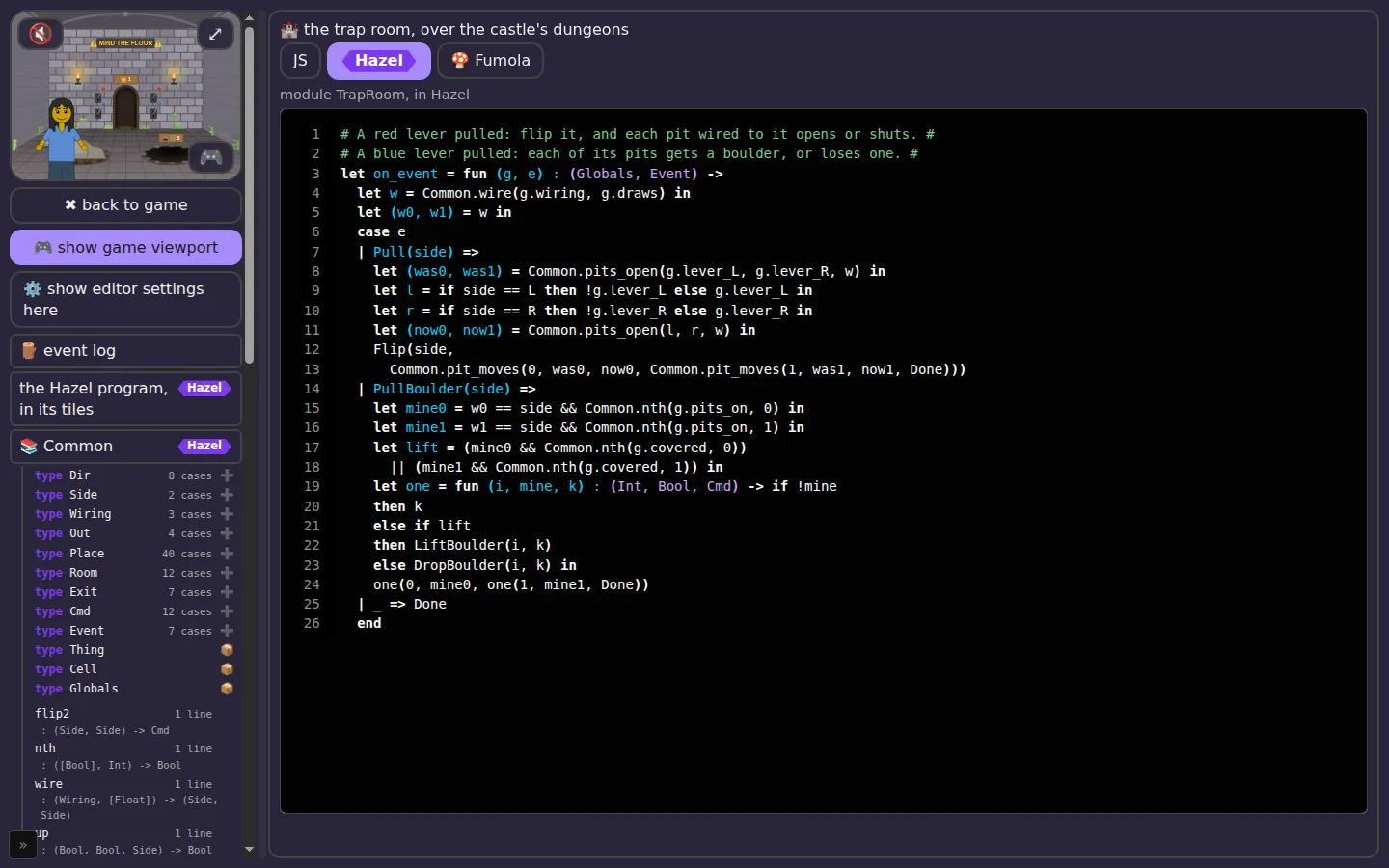
All of it is in one file of the game, js/25-scripting.js (read at the game's 0.0.491). The pieces, in the order an event meets them:
| Piece | What it does | In the game's code |
|---|---|---|
| The vocabulary | Hazel types, declared before every module: Cmd (what a rule may do, each command with the rest after it, ending in Done), Event, Globals, and sums for the game's own words (a lever's side L or R, a wiring, a direction, a kind of room). | SCRIPT_PREAMBLE |
| The modules | 📚 Common, then one per room; each is the text in one of the panel's editors. The tail of the program gives each room's on_event, held to the type a rule has. | scriptTailscriptSpec |
| Loading Hazel | The library, from hazeljs on a CDN, loaded with a script tag the first time a script runs or the tab opens. | hazelLoad |
| Building | Hazel.runProgram on the modules' texts, once per change of text (the texts are the cache key). It keeps the errors, holes and unfinished brackets, module by module, and each room's handler. | scriptCompile |
| Calling | Only when the program is ready: otherwise the game's own JS handler answers the event, and Hazel's answer, run as far as its errors allow, goes in the event log beside it. | scriptEventRun |
| The boundary | The game's own state has text where the rules have sums (a lever's name "L"); a wrapper turns text into constructors on the way in, and back on the way out. | scriptTyped |
| Acting | Walks the command chain, each command by the room's own method; Say and Wait are the game's everywhere; a command the room does not know ends the walk, and is said. | scriptRunSCRIPT_ACTS |
| Errors, said plainly | Hazel's messages are written for Hazel's developers; the game rewrites a type error as "this is wanted here, but this is that", by the game's own type names. | scriptErrorText |
The editor in the game is Hazel's own: its app, in a frame, showing each module in Hazel's tiles with its error marks, and posting each edit back to the game. That part is not in hazeljs; it comes from a branch build of Hazel (^report(39) has where each piece stands). Plain text boxes work too, and are where the game started.
Doing the same in another app: our Petri net example#
Six steps: declare the vocabulary as Hazel types; let users write modules against it; build the program with Hazel.runProgram; call the Hazel function only while the build is ok, and your own JS handler otherwise; carry out its commands; and show its errors by module.
To see what a second app takes, we did it ourselves, as another user of hazeljs would: we took the pattern out of the game and built a small app around a Petri net, in a repository of its own, matthewhammer/hazeljs-petri-example. It is now at version 0.0.7, and live at matthewhammer.org/hazeljs-petri-example: the rules in Hazel's editor on the left; the net, its buttons and its event log on the right; each error under the rule it is in; and full screen, with a divider between the columns. Its rules and its net are files (rules/*.hz, net.json), read both by its page and by a Node script, so the same rules run in both. This is what we did, in the order we did it; the code is cut from the files that ran. The next section runs the result on this page.
We installed
hazeljs.npm install hazeljs, thenimport Hazel from "hazeljs"in Node; in the page,<script src="https://cdn.jsdelivr.net/npm/hazeljs@0.0.4/hazel-lib.js">, which defineswindow.Hazel. We pinned the version: the package is a prototype, and its API may change in any release.We wrote the vocabulary first, as Hazel types in the program's preamble (
rules/preamble.hz), which every module sees: what a rule is told (Net), what can happen (Event), and what a rule may answer (Cmd). The answer is a chain of commands, each with the rest after it, ending inDone, so the page can walk it in order, log it, and refuse a command it does not know.type Arc = (place = Int, weight = Int) in type Transition = (name = String, inputs = [Arc], outputs = [Arc]) in type Net = (marking = [Int], transitions = [Transition], draw = Float) in type Event = + Fire(Int) + Step in type Cmd = + Done + Take(Int, Int, Cmd) + Put(Int, Int, Cmd) + Say(String, Cmd) in
Sum types go here, not inside a module: a type's constructors are in scope only where the type is. This is also where another group's nets would differ first: tokens that carry data, weights, a guard, a clock.
We split the rules into modules, as the game does: helpers in
Common, the handler inRules, each a text (and a file). A module's text is its members, with noin; one module sees the ones before it, by name (Common.fire).We built the program with
Hazel.runProgram, once per change of text. The tail is what the program gives back: here, the handler, held to its type.function build(rules) { const r = Hazel.runProgram(spec(rules)); return { ok: r.ok, errors: r.errors.map(e => `${e.module ?? "the program"}: ${e.message.replace(/\s+/g, " ")}`), holes: r.holes, incomplete: r.incomplete, ms: r.ms, handler: r.ok ? r.value : null }; }We kept our own JS handler, and call Hazel's only while the build is
ok; ours answers while a rule has errors, holes or unfinished brackets. Hazel still runs a program around its errors, so the page can log what Hazel would have said, but where an error stopped it, the value is a printout ({hazel: "..."}), not something to act on.function jsHandler(net, ev) { const t = net.transitions[ev.tag === "Fire" ? ev.value : 0]; const ok = t && t.inputs.every(a => net.marking[a.place] >= a.weight); if (!ok) return { tag: "Say", value: ["(js) cannot fire", { tag: "Done" }] }; let k = { tag: "Done" }; for (const a of [...t.outputs].reverse()) k = { tag: "Put", value: [a.place, a.weight, k] }; for (const a of [...t.inputs].reverse()) k = { tag: "Take", value: [a.place, a.weight, k] }; return { tag: "Say", value: ["(js) " + t.name, k] }; } const handlerOf = b => b.ok ? b.handler : jsHandler;We acted out the commands, and showed the errors by module. Values cross the boundary as plain JS: a labeled tuple is an object, a list an array, a constructor
{tag, value}, a function a JS function. The page keeps control: it refuses a command that would take a place below zero, and one it does not know.function perform(cmd, marking, log) { const m = marking.slice(); for (let c = cmd; c && c.tag !== "Done"; ) { const [a, b, rest] = Array.isArray(c.value) ? c.value : [c.value]; if (c.tag === "Take") { m[a] -= b; c = rest; } else if (c.tag === "Put") { m[a] += b; c = rest; } else if (c.tag === "Say") { log.push(a); c = b; } else throw new Error("a command this app does not know: " + c.tag); } return m; }
Three things tripped us along the way, none of them in the game's way of doing it; they are in What tripped us, after the limits.
For your own kind of Petri net. Most of what makes one group's nets differ from another's goes in three places: the vocabulary, the helpers, and the net's file. Coloured nets (tokens that carry data, which some groups call types): a place's tokens become a list of Hazel values of that place's type, and a transition's guard and output become Hazel functions, so Hazel's type checker checks the colours as they are written. Weights, inhibitor arcs, priorities, timing: a field in net.json, a case in Common, a word in the vocabulary. And which enabled transition fires is the rule's choice (Step), so a scheduling policy is a few lines of Hazel, swapped without touching the app. The repository's plan has what comes next for it, more nets among them, and a site of its own.
A worked example: a Petri net#
It carried over to a new domain on the first try. The firing rule is about 30 lines of Hazel in two modules, and it ran as written; in 2,000 random steps, the two processes were never both inside the shared section (the runs). The net runs on this page too, its rules in Hazel's own editor, every edit built by hazeljs from npm (try it).
The net is the classic small one for mutual exclusion: two processes, each idle or busy, and one lock. To become busy, a process takes the lock; to become idle again, it gives the lock back (Figure 3). The JavaScript app keeps the marking (the tokens in each place), and draws it. The rule decides what an event does: Fire(i) fires transition i if it can, and Step fires one of those that can, chosen by a random draw the app passes in.
Try it: this page is the app#
Below, this page plays the app. It loads hazeljs 0.0.4 from npm (through the jsDelivr CDN), keeps the net's marking, and draws it. The two modules of rules are in Hazel's own editor, one per module: Hazel's app in a frame, in the editable embed mode that Messed Up Dress Up uses. Every edit comes back to the page, which builds the program again with Hazel.runProgram. While the build is ok, Hazel's on_event answers each event. While it is not, the page's own JS handler answers, the status says why, and the log says who answered. Click a transition to fire it, or step at random.
Where an error shows. An error in a rule is outlined in Hazel's editor where it is, and its message appears under the listing it is in, with a ⚠️, and in the status beside the net, by module. (In Hazel's own app the message is in a bar at the bottom, which the editor in a frame does not have.) The first thing to try below makes one. A ¤ in the editor marks a gap, two pieces side by side with nothing joining them (0. 1, say): join them with an operator or a comma, or delete one.
enter1 takes a token from idle1 and one from lock, and puts one in busy1; leave1 does the reverse. Process 2 is the mirror image.With JavaScript on, this net runs, and the rules below are Hazel editors.
The vocabulary, the preamble every module sees. Each listing here is Hazel's editor: Ctrl+click a name (or F12 on it) to go to its definition, in whichever listing has it. The editors start with the text that ran in Node, and Reset the rules goes back to it.
type Arc = (place = Int, weight = Int) in
type Transition = (name = String, inputs = [Arc], outputs = [Arc]) in
type Net = (marking = [Int], transitions = [Transition], draw = Float) in
type Event = + Fire(Int) + Step in
type Cmd = + Done + Take(Int, Int, Cmd) + Put(Int, Int, Cmd) + Say(String, Cmd) in
# the i-th of a list of Ints, 0 past its end #
let nth = fun (xs, i) : ([Int], Int) ->
  case xs
  | [] => 0
  | x :: rest => if i == 0 then x else nth(rest, i - 1)
  end;
let len = fun xs : [Int] ->
  case xs | [] => 0 | _ :: rest => 1 + len(rest) end;
# the i-th transition, if there is one #
let pick = fun (ts, i) : ([Transition], Int) ->
  case ts
  | [] => None
  | t :: rest => if i == 0 then Some(t) else pick(rest, i - 1)
  end;
# every input place holds at least its arc's weight #
let has = fun (m, arcs) : ([Int], [Arc]) ->
  case arcs
  | [] => true
  | a :: rest => nth(m, a.place) >= a.weight && has(m, rest)
  end;
let enabled = fun (m, t) : ([Int], Transition) -> has(m, t.inputs);
# the indices of the transitions that can fire #
let ready = fun (m, ts, i) : ([Int], [Transition], Int) ->
  case ts
  | [] => []
  | t :: rest =>
    if enabled(m, t) then i :: ready(m, rest, i + 1)
    else ready(m, rest, i + 1)
  end;
# firing: take each input's tokens, then put each output's #
let takes = fun (arcs, k) : ([Arc], Cmd) ->
  case arcs
  | [] => k
  | a :: rest => Take(a.place, a.weight, takes(rest, k))
  end;
let puts = fun (arcs, k) : ([Arc], Cmd) ->
  case arcs
  | [] => k
  | a :: rest => Put(a.place, a.weight, puts(rest, k))
  end;
let fire = fun t : Transition ->
  Say(t.name, takes(t.inputs, puts(t.outputs, Done)))
# Fire(i): fire transition i, if it can. #
# Step: fire one of those that can, chosen by the app's draw. #
let fire_at = fun (n, i) : (Net, Int) ->
  case Common.pick(n.transitions, i)
  | None => Say("there is no transition " ++ string_of_int(i), Done)
  | Some(t) =>
    if Common.enabled(n.marking, t) then Common.fire(t)
    else Say(t.name ++ " cannot fire now", Done)
  end;
let on_event = fun (n, e) : (Net, Event) ->
  case e
  | Fire(i) => fire_at(n, i)
  | Step =>
    let r = Common.ready(n.marking, n.transitions, 0) in
    let k = Common.len(r) in
    if k == 0 then Say("deadlock: nothing can fire", Done)
    else
      let j = int_of_float(n.draw *. float_of_int(k)) in
      fire_at(n, Common.nth(r, j))
  end
Things to try.
- In
Rules, changefire_at(n, i)tofire_at(n, "one"). The status lists the type error by module, and the log shows the page's JS answering until you change it back. - Replace the
Stepcase's answer with?, a hole: no error, but not ready, and the status says so. - Make
Stepalways fire the first transition that can:let j = 0 in. Step ×100, and process 2 never runs: the rule decides who goes, not the app. - In
Common'sfire, leave outtakes(t.inputs, ...), so firing only puts tokens: the lock multiplies, and both processes can be busy at once. A rule can be well typed and still wrong; the types only fix the vocabulary.
What the Node runs showed#
Four events by hand (the app's log, then the marking it keeps): the second shows the lock doing its job.
| Event | The rule's answer, as the app logs it | Marking after (idle1, busy1, idle2, busy2, lock) |
|---|---|---|
Fire(0) | enter1 | [0, 1, 1, 0, 0] |
Fire(2) | enter2 cannot fire now | [0, 1, 1, 0, 0] |
Fire(1) | leave1 | [1, 0, 1, 0, 1] |
Fire(2) | enter2 | [1, 0, 0, 1, 0] |
2,000 random steps, from a fixed stream of draws: fired enter1 485, leave1 485, enter2 515, leave2 515; the two processes were both busy in 0 of the 2,000 markings, and the net ended where it began. The same counts in all three runs.
A mistake in a rule. Change fire_at(n, i) to fire_at(n, "one"), and the build is not ok; Hazel reports, before anything runs, by module:
Rules: Error in term: "one" Nature of error: Expecting type Int but got inconsistent type String
Rules: Error in term: n, "one" Nature of error: Expecting type Net, Int but got inconsistent type Net, String
One mistake gives two messages here, the argument and the pair around it; an app may want to show the first. Meanwhile the app's own JS handler answered Fire(0), so the simulation kept going.
A rule still being written. Replace the Step case's answer with a hole, ?: no error, but holes: {Rules: 1}, and ok is false. That is the state of a rule in the middle of an edit, and the app can say exactly that, rather than "syntax error".
What it costs#
A call costs about 3.3 ms, against 0.7 µs for the same handler in JS: fast enough for each click, but not yet for a simulator's inner loop. Building the program takes 338 to 366 ms, and rebuilding after an edit 138 to 154 ms (Node, three runs).
| Run | First build | Hazel call, median (p90) | Same, tail unannotated | JS handler call, median | Rebuild: one module changed / unchanged |
|---|---|---|---|---|---|
| 1 | 366 ms | 3.45 ms (4.17) | 3.19 ms (3.79) | 0.7 µs | 154 / 148 ms |
| 2 | 340 ms | 3.33 ms (4.01) | 3.18 ms (3.96) | 0.7 µs | 151 / 148 ms |
| 3 | 338 ms | 3.23 ms (3.91) | 3.10 ms (3.76) | 0.7 µs | 145 / 138 ms |
- A call is 3.2 to 3.4 ms (medians per run): the view and the event converted into Hazel values, the rule evaluated by Hazel's interpreter, the command converted back. That fits well inside a click or a key, and inside one frame of an animation; the game measured about the same, 3.5 ms of a 13.7 ms lever pull (
^report(39)). It does not fit a simulator's inner loop that fires millions of transitions: 2,000 steps took about 7 s of Hazel here. - The annotation in the tail is not the cost.
^report(25)found that a call into Hazel re-checked a function's type annotation on every call, which #2681 removes (not in 0.0.4). Building with the tail unannotated changed nothing measurable here (the table's fourth column). Where a call's time goes in this example is not measured yet;^report(25)'s other finding, a floor for crossing the boundary that grows with the argument, is the likely part, since every call here passes the whole net. - Building takes 338 to 366 ms, and rebuilding after an edit 138 to 154 ms, about the same whether a module changed or not. Fine for a build after a pause in typing; too slow for every keystroke on the main thread, which is why the game rebuilds only once typing has paused for 600 ms.
- The package is 2.8 MB unpacked, about 650 kB compressed: one file, Hazel itself compiled to JS.
Making the calls themselves faster is the subject of an experiment on the same agenda: compiling Hazel functions to JavaScript (^report(42), item 2).
Limits today#
- A prototype.
hazeljsis at 0.0.x, built from a draft library on two of Hazel's pull requests, #2711 and #2719, not from Hazel's main branch. The plan is for it to track that branch; a pull request to Hazel's README says so (#2812). - No editor in the package. It analyzes and runs text. Hazel's own tile editor in a frame, as the game and this page use it, comes from a branch build of Hazel, and takes messages only from a few sites. Planned: the editor in the package.
- Key order matters, by mistake. An object whose keys are in another order than its type's fields gets stuck when a field is a list (what tripped us). To be fixed in the library.
- Messages written for Hazel's developers, which an app will want to rewrite, as the game does.
- No undo, and no history, in the library: the app keeps its own. Planned: undo in the editor.
What tripped us#
Building the second app turned up three things the game's way of doing it never met, which is why a second app was worth building:
- Key order, a bug in
hazeljs0.0.4. We first passed the net's view as{transitions, marking, draw}, and every answer came back{hazel: "..."}. When a JS object's keys come in another order than its Hazel type's fields, and a field is a list, the value gets stuck at the type's annotation. So we build the view inNet's own order,{marking, transitions, draw}, until the library converts by label. Fixed inhazeljs0.0.5, published on 2026-11-06: a JS object's keys now meet a labeled tuple's fields by label, in any order. The app still pins 0.0.4, and moves to 0.0.5 next. - Hazel's editor frames are particular about where they run: they take messages only from a few sites (
localhostand this one), so the app has to be served from one of them, and a frame off the screen does not draw, so it reports its height as 0 until it is scrolled to. - No randomness or clock in Hazel: the page passes a random draw in with the view, as the game passes its draws, which also makes every call repeatable.
What next#
- Ask the group in Cambridge, through Cyrus, what their tools would want a Hazel rule to decide, and what their nets look like (sizes, colours, timing), before building more of the example.
- Measure where a call's 3 ms goes in this example: the boundary's conversions against the rule's own evaluation, and how both grow with the net's size.
- Once hazel-jit, the compiler of Hazel to JavaScript being designed for livelits' views (
^report(42), item 2), can compile this rule: put the JS it makes beside the page's own handler, the JS a person would write, and compare the two, the code side by side and the time per call. How close does the compiled rule come to the hand-written one? - A small helper in
hazeljsfor the pattern itself: give it the preamble, the modules and the handler's type, and get back a handler that falls back to yours while the rules are not ready.
How this was put together#
- The game was read, not run:
js/25-scripting.jsin matthewhammer/kids-choice-games at 15181ee0 (Messed Up Dress Up 0.0.491). The links in the table go to that commit's lines. - The example is one file,
043/example/petri.mjs: the preamble, the two modules, the app's JS (its own handler, the command walk) and every measurement in this report. The code shown above is cut from it by the page's generator, so it is the code that ran. - The runs: three, in Node v22.23.2 on a laptop (13th Gen Intel Core i7-1370P), with
hazeljs0.0.4 installed from npm into an empty folder (library version "0.1 (draft, js-library)", built from hazelgrove/hazel at 1ba138ef28). Times areperformance.now()around each call; a call's figures are the median and 90th percentile of 2,000 calls in a run. The page shows the median of the three runs' medians. Each run's output is in043/data/runs/. - The live example is
043/live.js: this page loadshazeljs0.0.4 from jsDelivr, and frames Hazel's editor frombuild.hazel.org/embed-editable, a branch build of Hazel whose embed mode takes edits (#2814, a draft stacked on #2719). Checked in a browser on 2026-11-06, served from a local port (the editor's frame takes messages only from this site and from local ports): both editors start and show the modules in Hazel's tiles; a click on a transition fires it; a type error typed into a module is listed by module, marked in the tiles, and the page's JS answers meanwhile; an edit typed in the tiles comes back to the page and is built again (about 180 ms in the browser); 100 steps took about 375 ms, close to Node's. Not checked: undo with Ctrl+Z in the tiles, which the test browser did not deliver to the frame. The times in the tables are Node's, not the page's. - The example app is matthewhammer/hazeljs-petri-example at 0.0.1 (46eb8ada01): the same rules and net as files, the same two page scripts, and a Node script that is this report's
043/example/petri.mjsreading those files. - The data: the runs as JSON in
043/data/runs/run1.jsontorun3.json, their printed output beside them, and043/data/meta.json; the page is made by043/gen043.pyfrom043/body.html. - The numbers, for programs too: every table in this report, and what its numbers measure, is also in this page as JSON, in its
<script type="application/json" id="report-data">element, so a reader or an agent that fetches the page alone has the dataset. The same, with any raw files that survive, is in043/data/.